Building an AI factory on Kubernetes: a GPU catalog for every customer
How a platform team can build an AI factory on Kubernetes and grow its GPU catalog with KubeVirt: a plain GPU VM with Ollama, and a GPU Kubernetes with HAMi, both on one two-L4 server.


On this page (31)
- What this post covers
- The machine
- The shape we are building
- Before you start: Prove the host can do passthrough
- Step 1: Have a Kubernetes cluster on the GPU node
- Step 2: Bind both cards to vfio-pci
- Why nvidia and vfio-pci cannot own the same card
- When the host does need the NVIDIA driver
- The bind
- Step 3: Install KubeVirt and allowlist the L4
- Step 4: Boot two VMs, one card each
- Step 5: tenant-1, a plain GPU VM with Ollama
- Install the NVIDIA driver
- Run a model with Ollama
- Step 6: tenant-2, a GPU VM with its own Kubernetes and HAMi
- Install RKE2 and Helm
- Install the GPU Operator
- Split the card with HAMi
- Step 7: Prove it end to end
- Errors you will actually hit
- A VM lost its GPU after a reboot of the host
- nvidia.com/AD104GLL4 is not allocatable, or shows fewer than you expect
- A third VM with a GPU never starts
- nvidia-smi shows nothing in tenant-1
- The guest cluster's node stays NotReady and DNS times out in tenant-2
- The HAMi pods stay Pending in tenant-2
- nvidia-smi is not found in tenant-2
- Growing the catalog
- What this does not do
- Wrapping up
- Credits and references
Buy a few GPUs and you are running a catalog, whether you call it that or not. The first request is easy. The second one is different. One team wants a machine with a GPU and root, and to be left alone. Another team wants a Kubernetes cluster where a dozen small services share a single card. A third wants nothing but a model endpoint.
A shared device plugin on one shared cluster serves none of them well. It gives everyone the same driver, the same CUDA stack and the same neighbours. The platform team ends up saying no, or building a one-off for every customer.
An AI factory fixes that by changing the question. Instead of "how do we share these cards?", you ask "what can we offer, and how cheaply can we add the next thing?" Each item in the catalog is a product with its own shape, its own isolation and its own cost to run. The platform underneath stays the same.
On Kubernetes, the foundation for that is KubeVirt. A GPU goes to a virtual machine, and the VM becomes the unit you hand out. The host cluster schedules VMs and never sees what runs inside. Every catalog item is then just a different thing inside that boundary. A customer who needs more than one kind of environment does not need more than one kind of platform.
Let's build the first two catalog items on a real machine, with every script we ran.
What this post covers #
This is a runbook. Seven steps, from a bare Ubuntu host to two Ubuntu VMs. Each VM owns one physical GPU and has its own NVIDIA driver. The two VMs are two catalog items, built for two different customer needs:
- GPU VM.
tenant-1is a plain machine with one whole L4. The customer installs what they like. Here that is Ollama running one model. This is the item for the customer who wants a card and no opinions. - GPU Kubernetes.
tenant-2has one whole L4 and its own Kubernetes cluster. The NVIDIA GPU Operator manages the driver, and HAMi splits that one card into ten schedulable GPUs. This is the item for the customer who has many small workloads and wants to share a card between them.
Both come from the same foundation: two cards on vfio-pci, one KubeVirt allowlist and one VM script. What changes is what goes inside.
Every install step here comes from a set of scripts we ran in order, and the checks are the commands we used to verify each one. The host needs no NVIDIA driver for this passthrough, and Step 2 explains why. Nothing here depends on a particular Kubernetes distribution.
Who this is for:
- Platform engineers who own GPU hardware and are asked to "just share the cards" across teams.
- Teams building an internal AI platform, who want a catalog they can extend as customer needs change.
- People running a small Kubernetes cluster who need stronger isolation than a shared device plugin.
The machine #
- Ubuntu 24.04 on bare metal, with an AMD EPYC 7452
- Two NVIDIA L4 cards, 23 GB each
- Kubernetes, on this machine as a node, with
kubectlpointed at it. Any distribution works. We used a single-node RKE2 v1.36.4. - KubeVirt v1.9.0
- Two VMs,
tenant-1andtenant-2, one L4 each - Inside
tenant-1: the NVIDIA open kernel driver 615.71.09 and Ollama 0.40.2 - Inside
tenant-2: RKE2 v1.36.4, NVIDIA GPU Operator v26.3.2 (which installs driver 580.126.20) and HAMi v2.10.0
You need root on the GPU node for the first two steps. After that the work runs from anywhere with kubectl, and from inside the VMs.
Both cards are NVIDIA L4s. lspci shows them:
root@utho:~# lspci -nn | grep -i nvidia
01:00.0 3D controller [0302]: NVIDIA Corporation AD104GL [L4] [10de:27b8] (rev a1)
41:00.0 3D controller [0302]: NVIDIA Corporation AD104GL [L4] [10de:27b8] (rev a1)10de:27b8 is the L4's PCI ID. Every later step, the KubeVirt allowlist in particular, has to use the ID your machine actually reports, so write it down before you write a manifest.
The two cards sit at 0000:01:00.0 and 0000:41:00.0. We hand both to KubeVirt and give one to each VM.
The shape we are building #
A PCI function is owned by exactly one driver at a time. KubeVirt can only hand a function to a VM when that driver is vfio-pci.
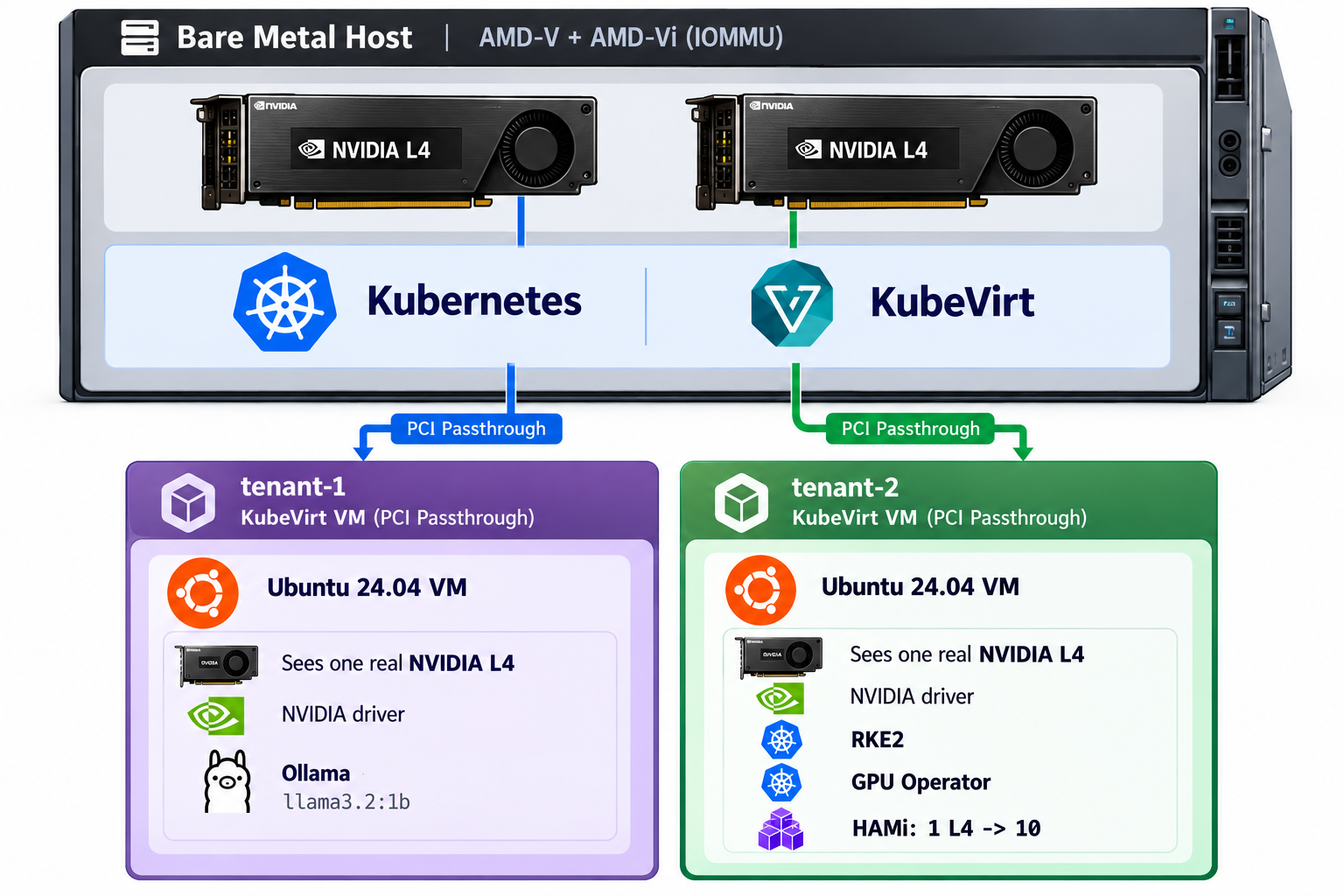
The host cluster schedules the VMs. It does not run the customer's job. A noisy notebook, a privileged pod or a CUDA upgrade inside one VM stays inside that VM.
Before you start: Prove the host can do passthrough #
KubeVirt needs hardware virtualization, and GPU passthrough additionally needs the IOMMU. On this EPYC box that is AMD-V and AMD-Vi.
root@utho:~# grep -m1 -o svm /proc/cpuinfo
svm
svm
root@utho:~# ls -l /dev/kvm
crw-rw---- 1 root kvm 10, 232 Oct  9 18:53 /dev/kvm
root@utho:~# dmesg | grep -i AMD-Vi | head
[    1.055072] AMD-Vi: Using global IVHD EFR:0x58f77ef22294ade, EFR2:0x0
[    2.125230] pci 0000:60:00.2: AMD-Vi: IOMMU performance counters supported
[    2.141294] pci 0000:40:00.2: AMD-Vi: IOMMU performance counters supported
[    2.158539] pci 0000:20:00.2: AMD-Vi: IOMMU performance counters supported
[    2.177095] pci 0000:00:00.2: AMD-Vi: IOMMU performance counters supported
[    2.196556] pci 0000:e0:00.2: AMD-Vi: IOMMU performance counters supported
[    2.210361] pci 0000:c0:00.2: AMD-Vi: IOMMU performance counters supported
[    2.226984] pci 0000:a0:00.2: AMD-Vi: IOMMU performance counters supported
[    2.246850] pci 0000:80:00.2: AMD-Vi: IOMMU performance counters supported
[    2.261040] AMD-Vi: Extended features (0x58f77ef22294ade, 0x0): PPR X2APIC NX GT IA GA PC GA_vAPIC
root@utho:~# lsmod | grep kvm
kvm_amd               212992  22
kvm                  1404928  19 kvm_amd
irqbypass              12288  14 vfio_pci_core,kvm
ccp 147456 1 kvm_amdYou want svm, a /dev/kvm node, kvm_amd in lsmod and AMD-Vi lines in dmesg.
Step 1: Have a Kubernetes cluster on the GPU node #
KubeVirt runs on top of Kubernetes, so the GPU machine needs to be a node in a cluster. Which distribution you pick does not matter for anything that follows. Every later step only uses kubectl.
If you already have a cluster with this machine in it, check that kubectl reaches it and move on:
root@utho:~# kubectl get nodes
NAME   STATUS   ROLES                AGE   VERSION
utho Ready control-plane,etcd 8d v1.36.4+rke2r1If you have no cluster, any distribution will do. We used a single-node RKE2 server. optional/rke2.sh installs it and waits for the node to be Ready:
curl -sfL https://get.rke2.io | INSTALL_RKE2_VERSION="v1.36.4+rke2r1" sh -
systemctl enable --now rke2-server
export KUBECONFIG=/etc/rancher/rke2/rke2.yaml
export PATH="/var/lib/rancher/rke2/bin:${PATH}"
kubectl get nodesRKE2 ships its own kubectl and writes its kubeconfig to /etc/rancher/rke2/rke2.yaml. On another distribution, the equivalent is whatever kubeconfig that distribution gives you.
Step 2: Bind both cards to vfio-pci #
Why nvidia and vfio-pci cannot own the same card #
A PCI function has one kernel driver bound to it at a time. That driver is the owner: it maps the card's registers and memory, sets up DMA and interrupts, and decides when the card is reset.
The nvidia driver is a full GPU driver. It takes the card and uses it itself, so the host kernel is driving the GPU.
vfio-pci is the opposite. It does no GPU work. It is a placeholder driver whose only job is to give the device to a user-space program through the IOMMU, which in this case is the QEMU process inside KubeVirt's virt-launcher pod. QEMU maps the real device into the VM, and the guest talks to the hardware directly.
Both cannot hold the card at once. If nvidia owned it, the host would be driving a device the VM expects to have to itself, and KubeVirt could not hand it over. So the card has to leave nvidia and move to vfio-pci before the VM starts.
Think of passing a USB stick through to a VM. The host does not need a driver for the stick, because the thing that uses it is the guest. It is the same here. The L4 will be used inside a VM, so the driver that matters lives inside that VM, and the host only has to get out of the way.
When the host does need the NVIDIA driver #
That only holds for whole-card passthrough. Suppose your card supports MIG and you want to cut a slice from it, a MIG-backed vGPU, and give that slice to a VM. Then the host does need the NVIDIA driver, because the host is the one carving the card up, and it does that by talking to the card through NVML. The VM gets a slice, not the card. The L4 has no MIG, so that route does not apply to this machine.
The bind #
Whatever driver owns a card now is unbound first, and then vfio-pci takes it. If you proved the cards with a host driver earlier, as we did, that driver is the one being unbound.
You bind by PCI address, not by ID. Both L4s share 10de:27b8, so a module option like vfio-pci.ids=10de:27b8 would take every L4 in the box. Today we want both, but the address list keeps the choice per slot. Leave one address out and that card stays with the host.
01-bind-card-to-vfio.sh does the move, as root on the GPU node. It takes a space-separated list in PCI_ADDRS and defaults to both cards on this machine:
PCI_ADDRS="0000:01:00.0 0000:41:00.0"

apt-get install -y driverctl
printf '%s\n' vfio vfio_iommu_type1 vfio_pci > /etc/modules-load.d/vfio.conf
modprobe vfio
modprobe vfio_iommu_type1
modprobe vfio_pci

# the persistence daemon holds the NVIDIA bind and makes unbind fail
systemctl stop nvidia-persistenced 2>/dev/null || true

for PCI_ADDR in ${PCI_ADDRS}; do
  echo "${PCI_ADDR}" > "/sys/bus/pci/devices/${PCI_ADDR}/driver/unbind"
  echo vfio-pci > "/sys/bus/pci/devices/${PCI_ADDR}/driver_override"
  echo "${PCI_ADDR}" > /sys/bus/pci/drivers/vfio-pci/bind
  driverctl set-override "${PCI_ADDR}" vfio-pci
doneUse driverctl, not just sysfs. A driver_override written to sysfs is gone after a reboot, and another driver claims the function again. driverctl set-override stores the choice per slot. Loading the three vfio modules at boot gives that override a driver to bind to.
Confirm both cards are bound before you go further:
root@utho:~# lspci -k -s 01:00.0    # Kernel driver in use: vfio-pci
01:00.0 3D controller: NVIDIA Corporation AD104GL [L4] (rev a1)
	Subsystem: NVIDIA Corporation AD104GL [L4]
	Kernel driver in use: vfio-pci
	Kernel modules: nvidiafb, nouveau, nvidia_drm, nvidia
root@utho:~# lspci -k -s 41:00.0    # Kernel driver in use: vfio-pci
41:00.0 3D controller: NVIDIA Corporation AD104GL [L4] (rev a1)
	Subsystem: NVIDIA Corporation AD104GL [L4]
	Kernel driver in use: vfio-pci
	Kernel modules: nvidiafb, nouveau, nvidia_drm, nvidia
root@utho:~# driverctl list-overrides
0000:01:00.0 vfio-pci
0000:41:00.0 vfio-pciStep 3: Install KubeVirt and allowlist the L4 #
KubeVirt here comes from the upstream operator manifest, not a Helm release. 02-kubevirt.sh applies the operator, waits for it, applies the KubeVirt custom resource, and installs CDI, which imports each guest's root disk. It uses whatever cluster your kubeconfig points at, so it is the same on any distribution:
VERSION=v1.9.0

kubectl apply -f "https://github.com/kubevirt/kubevirt/releases/download/${VERSION}/kubevirt-operator.yaml"
kubectl -n kubevirt rollout status deploy/virt-operator --timeout=300s
kubectl apply -f kubevirt/kubevirt-cr.yamlCheck that KubeVirt reports Deployed:
root@utho:~# kubectl get kubevirt -n kubevirt kubevirt
NAME       AGE   PHASE
kubevirt 21h DeployedThe script also installs the Containerized Data Importer (CDI) from its latest upstream release. CDI downloads the Ubuntu cloud image into a persistent volume, so what you install in a guest survives a pod recreation. It needs a StorageClass in the cluster, the default one or STORAGE_CLASS. We used the local-path default.
The CR is where passthrough is allowed. KubeVirt will not offer any host device until it is on this list. This is the CR running on our host:
apiVersion: kubevirt.io/v1
kind: KubeVirt
metadata:
  name: kubevirt
  namespace: kubevirt
spec:
  configuration:
    imagePullPolicy: IfNotPresent
    permittedHostDevices:
      pciHostDevices:
        - pciVendorSelector: "10DE:27B8"
          resourceName: nvidia.com/AD104GL_L4
imagePullPolicy: IfNotPresentThe selector matches every L4 in the machine. That is what we want now, because both cards are on vfio-pci. virt-handler in v1.9 registers only functions already bound to vfio-pci and skips any 10de:27b8 function whose driver is something else. So if you ever leave a card on the host driver, it is never registered.
That is why we leave externalResourceProvider unset. You do not need your own device plugin for this layout.
Wait until a node advertises the resource:
root@utho:~# kubectl get nodes -o jsonpath='{range .items[*]}{.metadata.name}{"\t"}{.status.allocatable.nvidia\.com/AD104GL_L4}{"\n"}{end}'
utho 2You want 2 next to the GPU node, one per card. If it shows less, a card is not on vfio-pci yet, or the CR has not been applied.
Step 4: Boot two VMs, one card each #
03-ubuntu-vm.sh creates a VM from the Ubuntu 24.04 cloud image. The guests run a driver and a model server in one case, and a Kubernetes cluster with the GPU Operator and HAMi in the other, so both are sized for the bigger job: 8 CPUs, 16 GiB of memory and a 100 GiB disk by default. Override them with VM_CPU, VM_MEMORY and DISK_SIZE. Each root disk is a 100 GiB volume in your StorageClass, so check the free space behind it before you create two.
The script defaults to GPU_COUNT=2, which puts both cards in one VM. That is a valid layout for a customer who needs two cards. For one card per customer, set GPU_COUNT=1 and run the script once per VM, with its own name and SSH port:
VM_NAME=tenant-1 NODE_PORT=30022 GPU_COUNT=1 ./03-ubuntu-vm.sh
VM_NAME=tenant-2 NODE_PORT=30023 GPU_COUNT=1 ./03-ubuntu-vm.shThe GPU stanza is the whole change from a normal KubeVirt VM. This is tenant-1:
apiVersion: kubevirt.io/v1
kind: VirtualMachine
metadata:
  name: tenant-1
  namespace: tenants
spec:
  runStrategy: Always
  dataVolumeTemplates:
    - metadata:
        name: tenant-1-root
      spec:
        source:
          http:
            url: https://cloud-images.ubuntu.com/noble/current/noble-server-cloudimg-amd64.img
        storage:
          resources:
            requests:
              storage: 100Gi
  template:
    metadata:
      labels:
        kubevirt.io/domain: tenant-1
    spec:
      architecture: amd64
      domain:
        machine:
          type: q35
        devices:
          disks:
            - disk:
                bus: virtio
              name: rootdisk
            - disk:
                bus: virtio
              name: cloudinitdisk
          gpus:
            - name: gpu1
              deviceName: nvidia.com/AD104GL_L4
          interfaces:
            - masquerade: {}
              name: default
        resources:
          requests:
            cpu: "8"
            memory: 16Gi
      networks:
        - name: default
          pod: {}
      volumes:
        - name: rootdisk
          dataVolume:
            name: tenant-1-root
        - name: cloudinitdisk
          cloudInitNoCloud:
            secretRef:
name: tenant-1-cloud-inittenant-2 is the same manifest with its own name, disk, Secret and label. Each VM asks for one nvidia.com/AD104GL_L4. You do not pick which physical card a VM gets. KubeVirt hands each VM a free one, and two VMs never get the same card.
The cloud-init user data holds a login password, so it does not sit in the VM manifest. The script puts it in a Secret named <vm>-cloud-init and the VM points at it with secretRef. KubeVirt reads the userdata key:
apiVersion: v1
kind: Secret
metadata:
  name: tenant-1-cloud-init
  namespace: tenants
stringData:
  userdata: |
    #cloud-config
    ssh_pwauth: true
    chpasswd:
      expire: false
      users:
        - name: ubuntu
          password: <generated>
          type: text
    users:
      - name: ubuntu
        sudo: ALL=(ALL) NOPASSWD:ALL
        shell: /bin/bash
        lock_passwd: false
        ssh_authorized_keys:
- <your public key>A few lines matter:
machine.type: q35, because the GPU is a PCIe device.gpus[].deviceNamemust match theresourceNamein the KubeVirt CR exactly.namespaceis wherever you want the VMs to live. The script defaults totenantsand creates it if missing.
The script also publishes SSH for each VM through its own NodePort service, 30022 for tenant-1 and 30023 for tenant-2, so you can reach a guest from outside the cluster. This is the one for tenant-1:
apiVersion: v1
kind: Service
metadata:
  name: tenant-1-ssh
  namespace: tenants
spec:
  type: NodePort
  selector:
    kubevirt.io/domain: tenant-1
  ports:
    - name: ssh
      port: 22
      targetPort: 22
nodePort: 30022Each run generates a random password and prints it at the end. The script reads your key from SSH_PUBLIC_KEY or ~/.ssh/id_rsa.pub, and you can set VM_PASSWORD to choose your own password. If the machine has no id_rsa.pub, as ours did, point SSH_PUBLIC_KEY_FILE at the key you do have, for example ~/.ssh/id_ed25519.pub, or pass the key itself in SSH_PUBLIC_KEY.
Check that both VMs are running and note their IPs:
root@utho:~# kubectl -n tenants get vm,vmi
NAME                                  AGE   STATUS    READY
virtualmachine.kubevirt.io/tenant-1   20h   Running   True
virtualmachine.kubevirt.io/tenant-2   14h   Running   True

NAME                                          AGE   PHASE     IP            NODENAME   READY
virtualmachineinstance.kubevirt.io/tenant-1   20h   Running   10.42.0.98    utho       True
virtualmachineinstance.kubevirt.io/tenant-2 14h Running 10.42.0.108 utho TrueThen log in to each one and check that the card arrived:
ssh -p 30022 -i ~/.ssh/id_rsa ubuntu@<IP_OF_THE_GPU_NODE>    # tenant-1
ssh -p 30023 -i ~/.ssh/id_rsa ubuntu@<IP_OF_THE_GPU_NODE> # tenant-2Inside each guest:
ubuntu@tenant-1:~$ lspci | grep -i nvidia
09:00.0 3D controller: NVIDIA Corporation AD104GL [L4] (rev a1)If your laptop cannot reach the NodePorts, jump through the GPU node to the VM's IP instead:
ssh -J root@<IP_OF_THE_GPU_NODE> ubuntu@10.42.0.98     # tenant-1
ssh -J root@<IP_OF_THE_GPU_NODE> ubuntu@10.42.0.108 # tenant-2Inside each guest, lspci shows one NVIDIA L4. In our guests it sits at 09:00.0, whichever physical card it is. If it shows nothing, fix it on the host: check that deviceName matches the advertised resource and that the card is still on vfio-pci.
From here on, every command runs inside a VM, as root. Switch with sudo -i. Steps 5 and 6 are independent. Do them in either order.
Step 5: tenant-1, a plain GPU VM with Ollama #
This is the simple tier. The customer gets a machine with a whole card and does what they like with it. We ran Ollama.
Install the NVIDIA driver #
A fresh guest has the L4 on its PCI bus and no driver for it. lsmod shows no nvidia module, and nvidia-smi does not exist. The guest does not inherit anything from the host. VFIO hands over the PCI device, and the guest kernel still needs its own driver.
We used the open kernel driver, version 615.71.09. Copy 01-nvidia-driver.sh into the VM, then run it as root:
hostname
lspci -nnk | grep -A5 -i nvidia
lsmod | grep -E 'nouveau|nvidia' || true
df -h /

bash 01-nvidia-driver.shThe first four commands are the starting point: a passed-through L4, no nvidia module and plenty of free disk. The script does this:
- Installs
ca-certificates,curlandlinux-headers-$(uname -r). DKMS needs the headers. - Downloads NVIDIA's Ubuntu 24.04 local repository package for
615.71.09, about 535 MiB, into/var/cache/, unless the file is already there. - Installs the repository package and runs
apt-get update. - Installs two pinned packages,
nvidia-headless-openandnvidia-persistenced, both at615.71.09-1ubuntu1. - Reboots the guest.
That reboot is the guest's, not the host's. The NVIDIA module cannot replace nouveau or bind the L4 until the guest restarts. Your SSH session drops. Wait until port 22 on the guest answers again. The VM keeps running and keeps its IP.
DKMS builds nvidia for the guest kernel, 6.8.0-142-generic in our case. You will see EFI variables are not supported from the module signing step. This VM has no Secure Boot, so ignore it.
When the guest is back, confirm the L4 belongs to the guest driver:
root@tenant-1:~# nvidia-smi
Sat Oct 10 09:39:09 2026
+-----------------------------------------------------------------------------------------+
| NVIDIA-SMI 615.71.09              KMD Version: 615.71.09     CUDA UMD Version: 13.4     |
+-----------------------------------------+------------------------+----------------------+
| GPU  Name                 Persistence-M | Bus-Id          Disp.A | Volatile Uncorr. ECC |
| Fan  Temp   Perf          Pwr:Usage/Cap |           Memory-Usage | GPU-Util  Compute M. |
|                                         |                        |               MIG M. |
|=========================================+========================+======================|
|   0  NVIDIA L4                      On  |   00000000:09:00.0 Off |                    0 |
| N/A   47C    P8             17W /   72W |       0MiB /  23034MiB |      0%      Default |
|                                         |                        |                  N/A |
+-----------------------------------------+------------------------+----------------------+

+-----------------------------------------------------------------------------------------+
| Processes:                                                                              |
|  GPU   GI   CI              PID   Type   Process name                        GPU Memory |
|        ID   ID                                                               Usage      |
|=========================================================================================|
|  No running processes found                                                             |
+-----------------------------------------------------------------------------------------+

root@tenant-1:~# lspci -nnk -d 10de: | grep -A3 '3D controller'
09:00.0 3D controller [0302]: NVIDIA Corporation AD104GL [L4] [10de:27b8] (rev a1)
	Subsystem: NVIDIA Corporation AD104GL [L4] [10de:16ca]
	Kernel driver in use: nvidia
Kernel modules: nvidiafb, nvidia_drm, nvidiaYou want driver 615.71.09, one NVIDIA L4 with about 23034 MiB, and Kernel driver in use: nvidia. If nvidia-smi shows nothing, the VM never received nvidia.com/AD104GL_L4, or the card is not on vfio-pci on the host. Fix that on the host. Installing a driver in the guest will not create a PCI device that was never passed in.
We did not install the NVIDIA Container Toolkit here. Nothing in this guest runs GPU containers, so the process that uses the card talks to the driver directly.
Run a model with Ollama #
Ollama is a small model server that uses the guest's GPU if it finds a driver:
curl -fsSL https://ollama.com/install.sh | sh
systemctl enable --now ollamaCheck the version:
root@tenant-1:~# ollama --version
ollama version 0.40.2Pull a small model and run it:
root@tenant-1:~# ollama pull llama3.2:1b
root@tenant-1:~# ollama run llama3.2:1b --verbose 'In one short sentence, what GPU are you running on if nvidia-smi shows an NVIDIA L4?'
root@tenant-1:~# ollama ps
NAME           ID              SIZE      PROCESSOR    CONTEXT    RUNNER      UNTIL
llama3.2:1b    baf6a787fdff    1.6 GB    100% GPU     4096       llamacpp    4 minutes from now
root@tenant-1:~# nvidia-smi
Sat Oct 10 09:40:32 2026
+-----------------------------------------------------------------------------------------+
| NVIDIA-SMI 615.71.09              KMD Version: 615.71.09     CUDA UMD Version: 13.4     |
+-----------------------------------------+------------------------+----------------------+
| GPU  Name                 Persistence-M | Bus-Id          Disp.A | Volatile Uncorr. ECC |
| Fan  Temp   Perf          Pwr:Usage/Cap |           Memory-Usage | GPU-Util  Compute M. |
|                                         |                        |               MIG M. |
|=========================================+========================+======================|
|   0  NVIDIA L4                      On  |   00000000:09:00.0 Off |                    0 |
| N/A   51C    P0             29W /   72W |    1670MiB /  23034MiB |      0%      Default |
|                                         |                        |                  N/A |
+-----------------------------------------+------------------------+----------------------+

+-----------------------------------------------------------------------------------------+
| Processes:                                                                              |
|  GPU   GI   CI              PID   Type   Process name                        GPU Memory |
|        ID   ID                                                               Usage      |
|=========================================================================================|
|    0   N/A  N/A           29211      C   ...local/lib/ollama/llama-server       1662MiB |
+-----------------------------------------------------------------------------------------+ollama ps showed llama3.2:1b at 100% GPU, and llama-server held about 1662 MiB. After that, the customer uses the model interactively with ollama run llama3.2:1b.
Step 6: tenant-2, a GPU VM with its own Kubernetes and HAMi #
This is the second tier. The customer gets the same whole card, plus a Kubernetes cluster of their own. HAMi then cuts that one card into slices, so many small workloads of the same customer can share it. Copy the guest/ folder into the VM, then run the scripts as root.
First check the GPU inside the tenant-2 vm using lspci
root@tenant-2:~# lspci | grep -i nvidia
09:00.0 3D controller: NVIDIA Corporation AD104GL [L4] (rev a1)Install RKE2 and Helm #
The VM is an ordinary Ubuntu machine with a GPU. Give it its own Kubernetes. RKE2 is one binary installer that brings containerd and kubectl with it, so there is nothing else to install first. guest/01-rke2.sh does it.
There is one thing to set before the install. A cluster inside a VM on a cluster is a cluster inside a cluster, and the two must not share address ranges:
mkdir -p /etc/rancher/rke2
cat > /etc/rancher/rke2/config.yaml <<'EOF'
cluster-cidr: 10.52.0.0/16
service-cidr: 10.53.0.0/16
cluster-dns: 10.53.0.10
EOF

curl -sfL https://get.rke2.io | INSTALL_RKE2_VERSION="v1.36.4+rke2r1" sh -
systemctl enable --now rke2-server

export KUBECONFIG=/etc/rancher/rke2/rke2.yaml
export PATH="/var/lib/rancher/rke2/bin:${PATH}"

curl https://raw.githubusercontent.com/helm/helm/main/scripts/get-helm-4 | bashCheck that the node is Ready:
root@tenant-2:~# kubectl get nodes
NAME       STATUS   ROLES                AGE   VERSION
tenant-2 Ready control-plane,etcd 15h v1.36.4+rke2r1Why the config.yaml. KubeVirt gives the guest the host cluster's DNS server, 10.43.0.10, over DHCP. RKE2's default service range is 10.43.0.0/16, the same as the host's. Left alone, the guest's own kube-proxy claims 10.43.0.10, the guest's DNS lookups get "connection refused", and the node stays NotReady with rke2-canal stuck in ImagePullBackOff because it cannot resolve the registry. We hit exactly that. Moving the guest's pod and service ranges fixes it, and the node was Ready in under a minute.
Wait until the node is Ready. This cluster belongs to the customer. The host cluster never sees it.
Install the GPU Operator #
A loaded kernel module is not enough for containers. The container runtime has to inject the driver libraries into a container too. The NVIDIA GPU Operator does both jobs. It installs the driver and the NVIDIA Container Toolkit, then registers the nvidia runtime with containerd. That is why this guest needs no manual driver install, unlike tenant-1. It also means the two tenants run different drivers. The operator installed 580.126.20 here, while tenant-1 runs 615.71.09. Neither customer had to agree on a version.
Install Helm in the VM, then add the chart repository and install version v26.3.2. guest/02-gpu-operator.sh does all of it:
helm repo add nvidia https://nvidia.github.io/gpu-operator
helm repo update

helm upgrade --install gpu-operator nvidia/gpu-operator \
  --version v26.3.2 \
  --namespace gpu-operator --create-namespace \
  -f gpu-operator-values.yaml \
--wait --timeout 20mThe values file carries the two settings that matter:
devicePlugin:
  enabled: false
toolkit:
  env:
    - name: CONTAINERD_SOCKET
      value: /run/k3s/containerd/containerd.sock
    - name: CONTAINERD_CONFIG
      value: /var/lib/rancher/rke2/agent/etc/containerd/config.toml
    - name: CONTAINERD_RUNTIME_CLASS
      value: nvidia
    - name: CONTAINERD_SET_AS_DEFAULT
value: "true"Why the toolkit.env block. RKE2 keeps its containerd socket and config in its own paths, not the usual ones. RKE2 reuses the k3s socket location, hence /run/k3s. These variables point the operator's toolkit at them, name the runtime class nvidia, and make it the default runtime.
Why the device plugin is off. HAMi brings its own device plugin in the next step. Two plugins advertising the same GPU would fight over it.
When it finishes, the operator pods run in gpu-operator, and a RuntimeClass named nvidia exists:
root@tenant-2:~# kubectl -n gpu-operator get pods
NAME                                                         READY   STATUS      RESTARTS   AGE
gpu-feature-discovery-zxjzv                                  1/1     Running     0          14h
gpu-operator-6d8769c57c-grnsv                                1/1     Running     0          15h
gpu-operator-node-feature-discovery-gc-847bb8f7b6-n8rgg      1/1     Running     0          15h
gpu-operator-node-feature-discovery-master-d98f944cd-xcz7x   1/1     Running     0          15h
gpu-operator-node-feature-discovery-worker-qwbc9             1/1     Running     0          15h
nvidia-container-toolkit-daemonset-b75h9                     1/1     Running     0          14h
nvidia-cuda-validator-cj7kp                                  0/1     Completed   0          14h
nvidia-dcgm-exporter-mjdjf                                   1/1     Running     0          14h
nvidia-driver-daemonset-5wlbr                                1/1     Running     0          15h
nvidia-operator-validator-v5s2v                              1/1     Running     0          14h

root@tenant-2:~# kubectl get runtimeclass nvidia
NAME     HANDLER   AGE
nvidia nvidia 15hThe driver lives in a container, not on the VM's own path. To run nvidia-smi against it from the VM, go through its root:
root@tenant-2:~# chroot /run/nvidia/driver nvidia-smi -L
GPU 0: NVIDIA L4 (UUID: GPU-69f37bdd-70f5-800e-2a0d-8249c9b1cb41)Split the card with HAMi #
One L4 is one GPU to Kubernetes. HAMi turns it into many. Its device plugin advertises ten slices of the card, and each pod can ask for a slice of memory and compute.
HAMi only schedules onto nodes labelled gpu=on. guest/03-hami.sh labels the node, adds the chart repository and installs 2.10.0:
kubectl label node --all gpu=on --overwrite

helm repo add hami-charts https://project-hami.github.io/HAMi/
helm repo update

helm upgrade --install hami hami-charts/hami \
  --version 2.10.0 \
  --namespace hami-system --create-namespace \
  -f hami-values.yaml \
--wait --timeout 10mThe default split count is 10, which is the "ten cards". The values file makes HAMi work with the GPU Operator's driver and toolkit:
devicePlugin:
  runtimeType: "containerd"
  runtimeClassName: "nvidia"
  deviceListStrategy: "cdi-annotations"
  extraArgs:
    - "-v=10"
    - "--device-discovery-strategy=nvml"
    - "--cdi-annotation-prefix=cdi.k8s.io/"
  libPath: /usr/local/vgpu
  nvidiaDriverRoot: /run/nvidia/driver
  passDeviceSpecsEnabled: false

  gpuOperatorToolkitReady:
    enabled: true

  tolerations:
    - operator: Exists

  extraEnvs:
    - name: NVIDIA_CTK_PATH
      value: "/usr/local/nvidia/toolkit/nvidia-ctk"
    - name: CDI_SPECS_DIR
value: "/var/run/cdi"Four lines of it need a reason:
runtimeClassName: "nvidia". The GPU Operator does not setcontainerd's default runtime name, so HAMi's monitor and its own NVML check need this to get the driver injected by the NVIDIA runtime.deviceListStrategy: "cdi-annotations". CDI-based injection through the container toolkit needs this exact value. The plain"cdi"is not valid.nvidiaDriverRoot: /run/nvidia/driver. The GPU Operator installs the driver under that path, not at the root of the filesystem.gpuOperatorToolkitReady.enabled: true. The HAMi plugin waits for the operator's toolkit before it starts.
Step 7: Prove it end to end #
Check the host first, then each tenant.
The host sees two VMs and nothing else. On the GPU node:
root@utho:~# kubectl -n tenants get vmi
NAME       AGE   PHASE     IP            NODENAME   READY
tenant-1   20h   Running   10.42.0.98    utho       True
tenant-2 14h Running 10.42.0.108 utho TrueYou want tenant-1 and tenant-2 both Running. The Ollama process, the guest cluster and their GPU memory are invisible to the host cluster. It only knows that two VMs each hold a PCI device.
tenant-1 has one card and runs its model on it. Inside the VM, nvidia-smi shows driver 615.71.09 and one NVIDIA L4 of about 23 GB. ollama ps shows the model at 100% GPU.
tenant-2 runs a different driver. The pods' nvidia-smi there reports driver 580.126.20 with CUDA 13.0, installed by the GPU Operator. The two customers never had to pick a common version.
tenant-2 advertises ten GPUs from one card. Inside the VM:
root@tenant-2:~# kubectl describe node | grep -A6 Allocatable
Allocatable:
  cpu:                8
  ephemeral-storage:  97743690881
  hugepages-1Gi:      0
  hugepages-2Mi:      0
  memory:             16367176Ki
nvidia.com/gpu: 10tenant-2 still has one physical card. nvidia-smi -L does not show ten devices. It shows the one L4, because HAMi splits the card in Kubernetes, not in the driver:
root@tenant-2:~# chroot /run/nvidia/driver nvidia-smi -L
GPU 0: NVIDIA L4 (UUID: GPU-69f37bdd-70f5-800e-2a0d-8249c9b1cb41)Two pods in tenant-2 each get 1 GiB of it. guest/gpu-test-pods.yaml creates two pods. Each asks for one GPU slice with a memory limit of 1024 MiB:
resources:
  limits:
    nvidia.com/gpu: 1
nvidia.com/gpumem: 1024root@tenant-2:~# kubectl apply -f guest/gpu-test-pods.yaml
root@tenant-2:~# kubectl wait --for=condition=Ready pod/gpu-test-1 pod/gpu-test-2 --timeout=300s
root@tenant-2:~# kubectl exec gpu-test-1 -- nvidia-smi
Sat Oct 10 10:14:10 2026
+-----------------------------------------------------------------------------------------+
| NVIDIA-SMI 580.126.20 Driver Version: 580.126.20 CUDA Version: 13.0 |
+-----------------------------------------+------------------------+----------------------+
| GPU Name Persistence-M | Bus-Id Disp.A | Volatile Uncorr. ECC |
| Fan Temp Perf Pwr:Usage/Cap | Memory-Usage | GPU-Util Compute M. |
| | | MIG M. |
|=========================================+========================+======================|
| 0 NVIDIA L4 On | 00000000:09:00.0 Off | 0 |
| N/A 51C P8 17W / 72W | 0MiB / 1024MiB | 0% Default |
| | | N/A |
+-----------------------------------------+------------------------+----------------------+
+-----------------------------------------------------------------------------------------+
| Processes: |
| GPU GI CI PID Type Process name GPU Memory |
| ID ID Usage |
|=========================================================================================|
| No running processes found |
+-----------------------------------------------------------------------------------------+
root@tenant-2:~# kubectl exec gpu-test-2 -- nvidia-smi
Sat Oct 10 10:14:44 2026
+-----------------------------------------------------------------------------------------+
| NVIDIA-SMI 580.126.20 Driver Version: 580.126.20 CUDA Version: 13.0 |
+-----------------------------------------+------------------------+----------------------+
| GPU Name Persistence-M | Bus-Id Disp.A | Volatile Uncorr. ECC |
| Fan Temp Perf Pwr:Usage/Cap | Memory-Usage | GPU-Util Compute M. |
| | | MIG M. |
|=========================================+========================+======================|
| 0 NVIDIA L4 On | 00000000:09:00.0 Off | 0 |
| N/A 51C P8 17W / 72W | 0MiB / 1024MiB | 0% Default |
| | | N/A |
+-----------------------------------------+------------------------+----------------------+
+-----------------------------------------------------------------------------------------+
| Processes: |
| GPU GI CI PID Type Process name GPU Memory |
| ID ID Usage |
|=========================================================================================|
| No running processes found |
+-----------------------------------------------------------------------------------------+That is HAMi's limit, enforced per pod, and it is how one passed-through card serves several workloads. Both pods see the same card at the same address. They each get their own 1 GiB window onto it.
That is the stack: two physical cards, passed through to two VMs by KubeVirt. One guest runs a model straight on its card. The other runs a Kubernetes cluster that shares its card between pods.
Errors you will actually hit #
A VM lost its GPU after a reboot of the host #
The driver_override lived only in sysfs. After a reboot another driver claims the function again and the VM goes dark. Run lspci -k first, then driverctl set-override <addr> vfio-pci. driverctl list-overrides should list both cards.
nvidia.com/AD104GL_L4 is not allocatable, or shows fewer than you expect #
Either a card is not bound to vfio-pci, or the KubeVirt CR has no permittedHostDevices entry. Check both. 03-ubuntu-vm.sh waits and then exits with this message instead of creating a VM that can never schedule.
A third VM with a GPU never starts #
Two cards allow two single-card VMs. A VM that asks for a third nvidia.com/AD104GL_L4 has nothing to schedule on and stays pending until a card is free.
nvidia-smi shows nothing in tenant-1 #
Either the driver script has not run, or the guest has not rebooted since it ran. If both are done, the VM never received the card. Check the host as described in Step 5.
The guest cluster's node stays NotReady and DNS times out in tenant-2 #
The guest's RKE2 is using the same service range as the host cluster. Check resolvectl status in the guest. If the DNS server is 10.43.0.10 and the guest's kube-proxy is running, set the cluster-cidr, service-cidr and cluster-dns values from Step 6 and reinstall RKE2 with rke2-killall.sh and rke2-uninstall.sh.
The HAMi pods stay Pending in tenant-2 #
HAMi only schedules onto nodes labelled gpu=on. Check the label with kubectl get nodes --show-labels.
nvidia-smi is not found in tenant-2 #
The driver is installed by the GPU Operator in a container, so it is not on the VM's own path. Use chroot /run/nvidia/driver nvidia-smi.
Growing the catalog #
The two tenants are two products a platform team can put in its catalog.
The GPU VM is the default. One whole card, hardware isolation from every other customer, and one machine to patch. It suits a customer who wants to run one thing well, like a model server.
The GPU Kubernetes is the opt-in. It suits a customer with many small workloads, such as notebooks or small inference services, who would otherwise want a card each. HAMi lets one card serve them, with a VRAM limit per pod.
The sharing happens inside one customer's VM. That is the point. If you ran HAMi on the host cluster instead, different customers would share a card through software, which is the situation a catalog like this is meant to avoid. The VM stays the boundary between customers, and HAMi only divides the card among workloads that already trust each other.
The next item is cheaper than the first. Look at what the second tenant needed on the host: nothing. The bind, the allowlist and the VM script were already there. Only the inside of the VM changed. That is how a catalog grows. When a new customer need shows up, ask which part of the stack is theirs to change, and put that part inside the VM. A card that supports MIG could become an item of its own, with a slice handed to a VM. That one needs the NVIDIA driver on the host, so it is a different foundation and a different post.
Be honest about the cost of each item when you list it. The GPU VM is one machine to patch. The GPU Kubernetes is a second cluster to look after. Put that in the catalog entry, so customers choose it on purpose.
What this does not do #
The host gives each customer a whole card. There is no sharing of one card between customers and no hardware slicing. An L4 has no MIG. Carving a MIG-backed vGPU from a card that supports it is a different setup, and it needs the NVIDIA driver on the host. That is a different article.
HAMi slices memory and compute in software, by intercepting CUDA calls. It is a way to share one card between trusted workloads inside one customer's VM. It is not hardware isolation between them, which is what the VM boundary gives you between customers.
A customer VM is also a computer you now operate. It needs disk, backups, an SSH path or console, and an upgrade story. The Kubernetes tier adds a cluster on top of that, with RKE2, the GPU Operator and HAMi to keep current. KubeVirt removes the second physical server. It does not remove the second machine to look after.
Wrapping up #
Five things to carry out of this.
One. Check the PCI ID your hardware actually reports. The KubeVirt allowlist depends on it.
Two. Bind by PCI address and persist it with driverctl. An ID-wide option takes every card of that model, and a sysfs-only override disappears on reboot. With both cards bound, KubeVirt advertises nvidia.com/AD104GL_L4: 2.
Three. For whole-card passthrough the host needs no NVIDIA driver. Each card goes to vfio-pci, and the driver lives inside the VM that owns it, which is what keeps each customer's stack separate. If you want the host to slice a card instead, the host needs the driver.
Four. One card per VM means one customer per card. tenant-1 runs a model straight on its card. tenant-2 runs its own Kubernetes, and HAMi's ten GPUs exist in that cluster, not in the driver. nvidia-smi -L in the VM still shows one card.
Five. Share inside the VM, not across it. HAMi is a good fit for one customer's own workloads, and the VM is the boundary between customers.
A card you give a customer moves to vfio-pci and shows up in one KubeVirt VM with its own driver. The platform team keeps the hardware and a catalog that can grow. The customer gets the machine that fits their need.
Credits and references #
- KubeVirt host device assignment: kubevirt.io/user-guide/compute/host-devices
- NVIDIA GPU Operator: nvidia.github.io/gpu-operator
- HAMi: project-hami.github.io/HAMi
- Containerized Data Importer: github.com/kubevirt/containerized-data-importer
- Ollama: ollama.com
- RKE2 documentation: docs.rke2.io
Building Hybrid K8s Platforms @trivago | Tech Author & Speaker (freeCodeCamp, SREDays) | vCluster Ambassador | RHCA & GCP DevOps Professional
Get new posts in your inbox.
Spotted a typo or want to improve this post? Edit on GitHub →